Once-weekly injection
The Ozempic® tracker app
Ozempic (semaglutide) is a once-weekly GLP-1 injection made by Novo Nordisk. Because a whole week passes between shots, it's easy to lose track of your dose day, which site you used last, and how side effects line up with your schedule — exactly what DoseDash keeps organized.


Scan with your iPhone
The quick answer
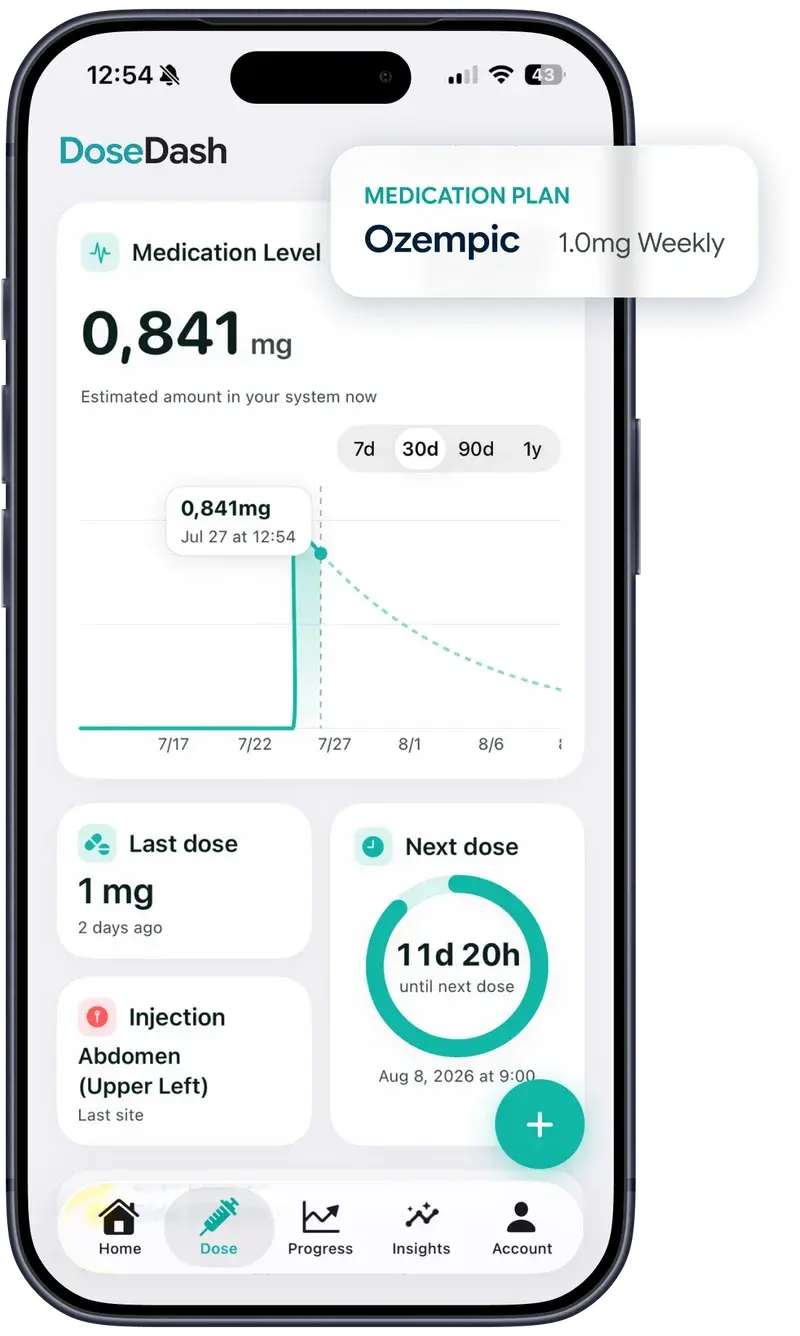
The easiest way to track Ozempic is a dedicated GLP-1 tracker app. DoseDash logs every weekly shot, reminds you on your dose day, tracks injection sites and side effects, and charts an estimated medication level between doses — free to download on iPhone.
How DoseDash helps with Ozempic
- Weekly dose-day reminders so you never miss your Ozempic shot
- Estimated medication-level chart between doses, based on semaglutide's published half-life
- Interactive body map with injection-site rotation suggestions
- Side-effect logging with severity scores, charted against your dose schedule
What if you miss an Ozempic dose?
Per the official prescribing information: if you miss an Ozempic dose, take it as soon as possible within 5 days of the missed dose. If more than 5 days have passed, skip the missed dose and take your next dose on your regularly scheduled day. Never take two doses to make up for a missed one, and confirm with your prescriber if you're unsure.
Official source: ozempic.comTypical Ozempic dose schedule
| Dose | When |
|---|---|
| 0.25 mg | Weeks 1–4 (starter dose) |
| 0.5 mg | Weeks 5–8 |
| 1 mg | If needed, after 4 weeks on 0.5 mg |
| 2 mg | Maximum, if needed after 4 weeks on 1 mg |
This is the typical dose-escalation schedule from the official label. Your prescriber sets your actual plan — always follow their instructions.
Taking Ozempic: the basics
- Injected under the skin (subcutaneously) in the abdomen, thigh or upper arm
- Rotate injection sites each week to avoid irritation — DoseDash's body map remembers where you injected last
- Same day each week, any time of day, with or without food
- Unopened pens are stored in the fridge; check the label for in-use storage rules
Start tracking Ozempic in 3 steps
- 1Download DoseDash free on the App Store and pick Ozempic from 30+ supported GLP-1 medications.
- 2Set your dose day and current dose — reminders and the level chart configure themselves.
- 3Log each dose in one tap, add side effects and meals as they happen, and watch your trends build within the first week.
Why not just use a notes app?
Notes capture what happened; a tracker shows what it means. Where a note says “injected Tuesday, felt queasy Thursday,” DoseDash charts the estimated semaglutide level between doses, lines your side effects up against it, reminds you before your next dose is due, and turns months of entries into a report your care team can read in seconds.
Ozempic tracking FAQ
Is there a free app to track Ozempic shots?
Yes. DoseDash is free to download on the App Store and includes core Ozempic tracking — dose logging, reminders, injection sites and side effects. A premium upgrade unlocks the full experience.
What happens if I miss my Ozempic dose?
The official guidance is to take the missed dose within 5 days; after that, skip it and resume your normal schedule. DoseDash shows how long it's been since your last dose so you always know where you stand — but confirm any change with your prescriber.
How long does Ozempic stay in your system?
Semaglutide's half-life is about one week, which means it takes roughly 5 weeks after the last dose to largely clear from your system. DoseDash's medication-level chart visualizes this curve after every logged shot.
Where should I inject Ozempic?
Ozempic is injected under the skin of the abdomen, thigh or upper arm, and it's recommended to rotate sites. DoseDash records every site on a body map and suggests where to rotate next.
What should I log while taking Ozempic?
At minimum: each dose with date and injection site, side effects like nausea with a severity score, your weight, and protein, fiber and water intake. Logging these in DoseDash lets its insights connect how you feel to your dose schedule.
Can DoseDash track my Ozempic titration schedule?
Yes. Update your dose amount whenever your prescriber changes it — your reminders, history and medication-level chart adjust automatically, and your full dose history stays intact.
DoseDash is a tracking and educational tool — not medical advice. Ozempic® is a trademark of its owner; DoseDash is not affiliated with, endorsed by or sponsored by Novo Nordisk or any pharmaceutical company. Dosing information above summarizes publicly available prescribing information and may change — always follow the guidance of your prescriber and care team.
Last updated: 2026-08-26

Start your Ozempic journey with DoseDash
Helpful guides
- Missed a GLP-1 dose? Rules for every medication
- GLP-1 injection sites & rotation
- Managing GLP-1 nausea & side effects
- GLP-1 medications compared
- Helping a partner or parent track their GLP-1